
You need to restock. The peg where the Magpul PMAGs hang is bare. The Hoppe's cleaning kit hook has been empty since Saturday. You're down to two bottles of Break Free CLP and the Federal 9mm shelf has a gap you could park a truck in.
So you open RSR. Search the PMAG. Check price. Check stock. Write it down or keep the tab open. Then you open Lipsey's. Same search. Different SKU format. Different price. Then Sports South. Then Davidson's.
Four websites. Four logins. Four different SKU systems. Four different ways of telling you the same product costs a slightly different amount.
By the time you've compared pricing on three products across four distributors, you've burned 20 minutes and you're still not done. You haven't placed an order yet. You've just been shopping.
Now multiply that by every product you need to reorder this week. If you're restocking 15-20 SKUs — a normal week for a mid-volume store — you're spending hours on what should be a straightforward operational task. Hours that could go toward customers, merchandising, or literally anything else.
The PO Builder Changes the Workflow Entirely
The PO Builder inside Mission Control reduces the entire restock process to two actions: scan and decide.
You scan a UPC — or type it in manually. The system queries every connected distributor in real time and returns a single comparison table showing you who has it, what they charge, and whether it's in stock. One scan. All distributors. One screen.
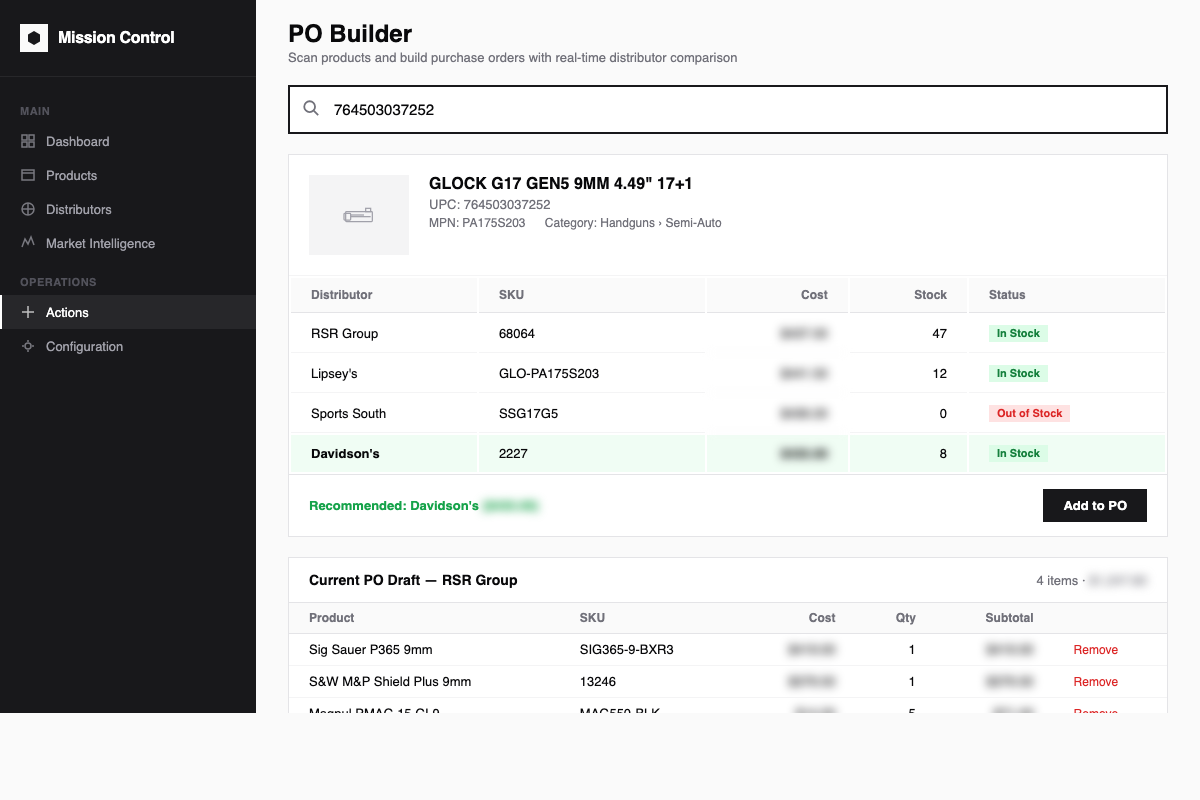
Scan a UPC and instantly compare pricing and stock across every connected distributor. The best price is highlighted automatically.
The comparison table shows you:
- Every distributor that carries the product — RSR, Lipsey's, Sports South, Davidson's, and any others connected to your system
- Each distributor's SKU — so you're looking at the correct line item, not guessing based on product name
- Real-time cost from each source — pulled live from distributor APIs, not cached data from last week
- Current stock status — in stock or out of stock, right now
- A recommendation — the system highlights the best-price in-stock option automatically
How It Actually Works, Step by Step
Step 1: Scan. Grab the empty peg tag or the last item on the shelf. Scan the barcode. Or type the UPC. Or search by product name or manufacturer part number.
Step 2: Review. The system hits every distributor API simultaneously and builds the pricing table in seconds. You see the product details — name, UPC, manufacturer, category — and below that, every distributor option with price and availability.
Step 3: Add. Hit "Add to PO" on the distributor you want to order from. The system recommends the lowest-cost in-stock option, highlighted in green. If you prefer a different distributor — maybe you're consolidating freight, maybe you have a relationship you want to maintain — you pick the one you want.
Step 4: Repeat. Scan the next product. And the next. Each one takes seconds, not minutes. You're building your restock list at the speed of scanning, not the speed of browsing four websites.
Step 5: Generate. When you're done scanning, hit "Generate Purchase Orders." The system groups your selections by distributor automatically. If you added cleaning supplies from RSR, magazines from Lipsey's, and holsters from Davidson's, you get three purchase orders — already populated with the correct distributor SKUs, prices, and quantities. Real purchase orders, ready to confirm and send.
What This Replaces
No more tabbing between distributor websites. You're not logging into RSR, then Lipsey's, then Sports South, then Davidson's. You're not maintaining four sets of bookmarks, four saved passwords, four different search interfaces.
No more manual price comparison. You're not writing prices on a notepad or keeping a spreadsheet open to compare costs across vendors. The comparison happens automatically, every time, on every product.
No more guessing about stock. "I think RSR had those last week" is replaced by a real-time stock check. If it says in stock, it's in stock right now. If it says out of stock, you don't waste time placing an order that's going to get backordered.
No more re-keying orders. When you order from RSR's website, you still have to enter that PO in your own system. With the PO Builder, the purchase order IS in your system. It was born there. The distributor SKU, the price, the quantity — all of it is already in Odoo. There's no second entry.
No more forgetting who had the best price. You checked four distributors, you found the best price, and then you got interrupted by a customer. Twenty minutes later you can't remember if it was RSR or Davidson's. The PO Builder holds the comparison until you act on it.
The Draft PO Accumulates as You Work
As you scan and add products, the PO Builder maintains a running draft at the bottom of the screen. You can see everything you've queued up — product, distributor, SKU, cost, quantity, and line total. You can adjust quantities, remove items, or change your distributor selection before generating the final orders.
This is important because restocking isn't always a single session. Maybe you walk the store in the morning and scan everything that's low. Maybe you scan a few items between customers. The draft holds your work until you're ready to commit it.
When you generate, the system creates one purchase order per distributor. Each PO has the correct vendor, the correct SKUs, the correct pricing. If a product doesn't exist in your catalog yet — maybe it's a new item you haven't carried before — the system creates the product record automatically with the UPC, name, and cost data from the distributor lookup.
Products That Don't Exist Yet
When you scan a UPC that isn't in your system, most reorder tools stop. "Product not found." Now you have to go create the product, come back, and try again.
The PO Builder doesn't stop. It finds the product in the distributor data, shows you the pricing comparison, and when you add it to your PO, it creates the product in Odoo for you. Name, UPC, manufacturer, category, cost — populated from the lookup. You don't break your workflow to do data entry.
This is especially useful when you're bringing in a new accessory line, expanding into a holster brand you haven't carried before, or ordering something a customer specifically requested. Scan, review, add, move on.
File Import for Larger Orders
Not every restock is a walk-the-floor, scan-as-you-go situation. Sometimes you're working from a distributor's deal sheet. Sometimes you have a spreadsheet from your buyer. Sometimes you're importing a show order.
The PO Builder handles that too. Upload a CSV or Excel file with UPCs and quantities. The system parses the file, matches products by barcode or part number, and builds the purchase order lines automatically. It auto-detects column headers — UPC, quantity, cost, product name — so you don't have to map fields manually every time.
Lines that match existing products get added directly. Lines that don't match get flagged so you can resolve them — search for the product, create it, or skip it. The import gives you a clear summary: how many lines imported, how many need attention, how many were duplicates that got consolidated.
This Is an Operations Problem, Not a Technology Problem
You already know what you need to order. You already know who sells it. The bottleneck has never been knowledge — it's been the mechanical process of checking four systems, comparing prices, and entering orders in two places.
The PO Builder removes the mechanical part. The decisions are still yours. Which distributor, how many units, whether to consolidate for freight — those are judgment calls that require a human. But the price lookups, the stock checks, the comparison tables, the PO creation — that's just data movement. And data movement should be automated.
Your shelves don't restock themselves. But the purchase orders that restock them should take minutes, not hours.
Want to see the PO Builder in action? Schedule a demo at missioncriticalbps.com and we'll scan a few products live and show you what restocking looks like when you stop logging into four websites.