It's Wednesday afternoon. A customer in Phoenix places an online order for eight items.
A Glock 17 Gen5. A Sig Sauer P320. A red dot sight. Two magazines. A holster. A cleaning kit. A case of 9mm.
Eight items. Four potential distributors. Two firearms that can't ship to the customer's door. And — if you're doing this manually — anywhere from 45 minutes to two hours of work before anything actually moves.
You have to log into each distributor's portal. Compare pricing. Figure out which combination of orders minimizes what you're spending on shipping while also keeping your customer from getting four separate packages. Make sure the firearms route to your FFL and the accessories go direct. Create the purchase orders. Submit them one by one.
Then wait. For emails. For tracking numbers. For invoices that may or may not match what you were quoted.
Mission Control handles all of it in seconds. Not some of it. All of it.
The Problem With "Cheapest Item Wins"
The obvious approach to multi-item drop-ship orders is to route each line item to whichever distributor has it cheapest. Simple logic, clean execution.
Except that's not actually how it works in the real world.
If you route each of those eight items to its cheapest source, you might end up with five separate purchase orders to five separate distributors. Five separate shipments to your customer. Five separate tracking numbers. Five separate invoices to reconcile. And a customer who gets confused when three boxes show up on different days from addresses they don't recognize.
The "cheapest item" approach optimizes for cost on a per-line basis and ignores every other cost that actually matters.
Mission Control doesn't think in line items. It thinks in baskets.
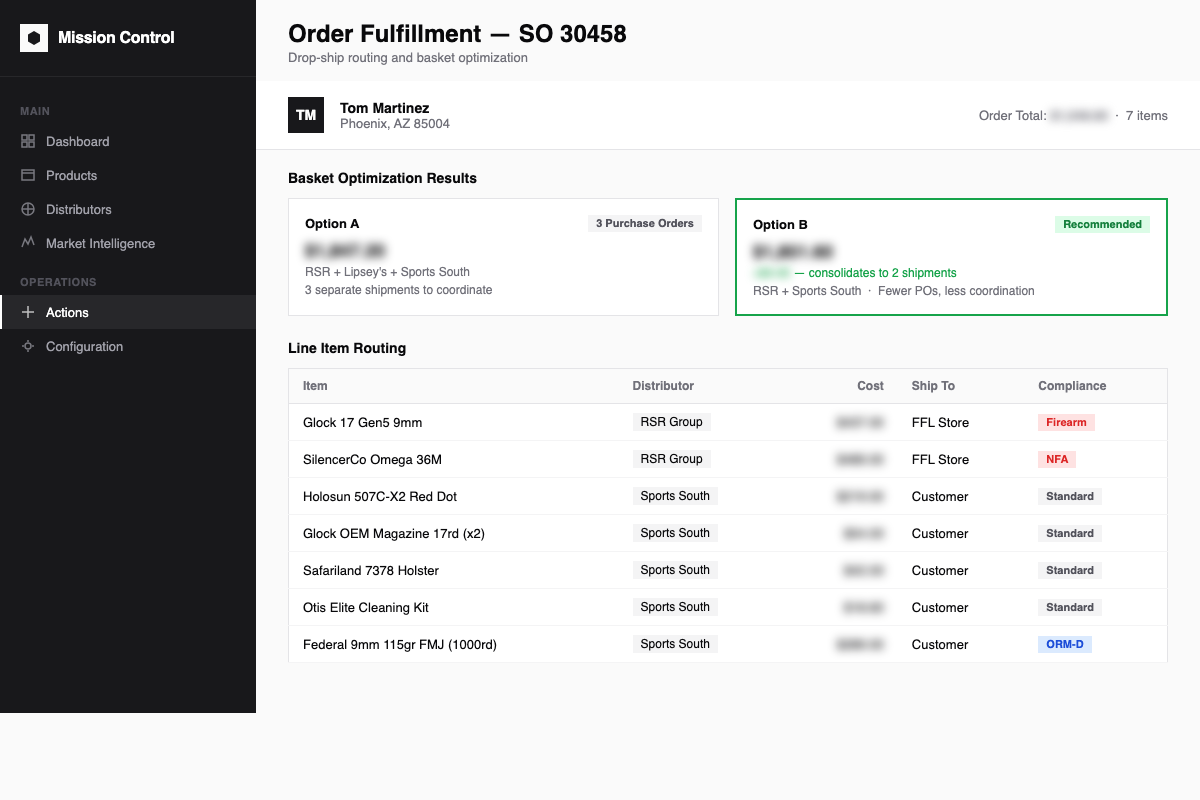
When that eight-item order hits the system, Mission Control evaluates the entire order together — all eight lines simultaneously. It's looking for the optimal combination of distributors that minimizes total cost while also minimizing the number of purchase orders and shipments. If consolidating two distributors into one adds a few dollars, it'll make that trade. Specifically, it will accept up to a 5% cost premium on individual items to keep the order consolidated.
A $4 premium on a $499 item to avoid splitting a customer's order across three shipments is a good trade. Mission Control makes that call automatically, every time, without you thinking about it.
Three Modes. You Pick the Dial.
Not every store wants the same level of automation. Some operations need human eyes on every order before anything ships. Others want the whole thing to run without touching it.
Mission Control has three fulfillment modes, and you set them at the store level — or even per distributor if you want that level of control.
Manual. The system does all the analysis — basket optimization, distributor selection, cost comparison, compliance routing — and then creates draft purchase orders for your team to review. Nothing moves until a human approves it. Full automation of the thinking, with a human in the loop before execution.
Semi-Auto. Purchase orders are confirmed automatically inside Odoo, but the submission to the distributor's API is held. Your team sees a queue of confirmed POs and clicks "Send" when they're ready to release. You've eliminated the analysis and the PO creation, but kept one checkpoint before the order actually leaves the building.
Full-Auto. Order comes in. System analyzes. POs are confirmed. Submissions go to the distributor APIs. Done. Nobody touches it. As a safety valve, you can set a maximum order amount for full-auto processing — anything above that threshold drops back to manual review, so you're not auto-submitting a $12,000 order at 2 AM without knowing about it.
Most stores start on Semi-Auto and move to Full-Auto once they've seen enough orders go through to trust the system's decisions. That usually takes about a week.
Compliance Routing That Doesn't Require a Checklist
Here's the piece that'll keep you up at night if it goes wrong.
Firearms can't ship to a customer's home address. They have to go to your FFL — where the 4473 gets processed and the transfer happens correctly. Accessories, optics, and ammo can go direct. When an order has both, you need split shipments with different ship-to addresses on different POs.
When you're manually routing orders, this is a mental checklist you're running on every item. Did you remember to change the ship-to address on the Glock? Did you catch that the P320 is in the same PO as the holster that's going direct to the customer?
Mission Control doesn't use a checklist. It uses product flags.
Every SKU in the system carries a designation — standard or firearm. When Mission Control generates purchase orders, compliance routing happens automatically based on those flags. Firearms route to the dealer's FFL address without anyone specifying it. Standard accessories go direct to the customer. Split shipments happen automatically when an order contains both regulated and non-regulated items.
The Phoenix customer gets their red dot, magazines, holster, cleaning kit, and 9mm direct. The Glock and the P320 route to your FFL for proper transfer. Mission Control generates separate POs with correct ship-to addresses for each. Your compliance exposure stays where it belongs — at zero.
Logged. Auditable. Explainable.
Every fulfillment decision is logged: which distributor was selected, what the alternatives were, what the cost difference was, and why the system made the call it made. If Mission Control chose Sports South over Lipsey's on a particular line item, you can pull up that decision record and see exactly what it was looking at.
This builds trust in the automation — your team can audit decisions until they're comfortable that the system is making good calls. And it creates an audit trail if you ever need to reconstruct an order's history, whether that's for an accounting reconciliation, a distributor dispute, or an internal review.
Real-Time Status Without the Email Chain
Once POs are submitted via API, Mission Control pulls status back from each distributor — RSR Group, Lipsey's, Sports South, Chattanooga, Davidson's, Zanders. Shipping dates, tracking numbers, order confirmations, backorder notifications. All of it flows back into the system automatically and attaches to the originating sales order.
Your customer's order record shows where everything is. Your customer service team doesn't have to call a distributor's 800 number to find out what's happening with a shipment. The information is in the system.
One order. Multiple distributors. One place to look.
The Part That Changes Your Operation
The manual version of that eight-item order in Phoenix? 45 minutes to two hours, assuming no complications, assuming you route the firearms to your FFL correctly, assuming you remember to check three distributors before deciding where to send each item.
The Mission Control version? Seconds. Correctly routed. Compliance-aware. Logged. Tracked.
That's not a marginal improvement. That's a different operation.
Ready to See It Handle Your Next Order?
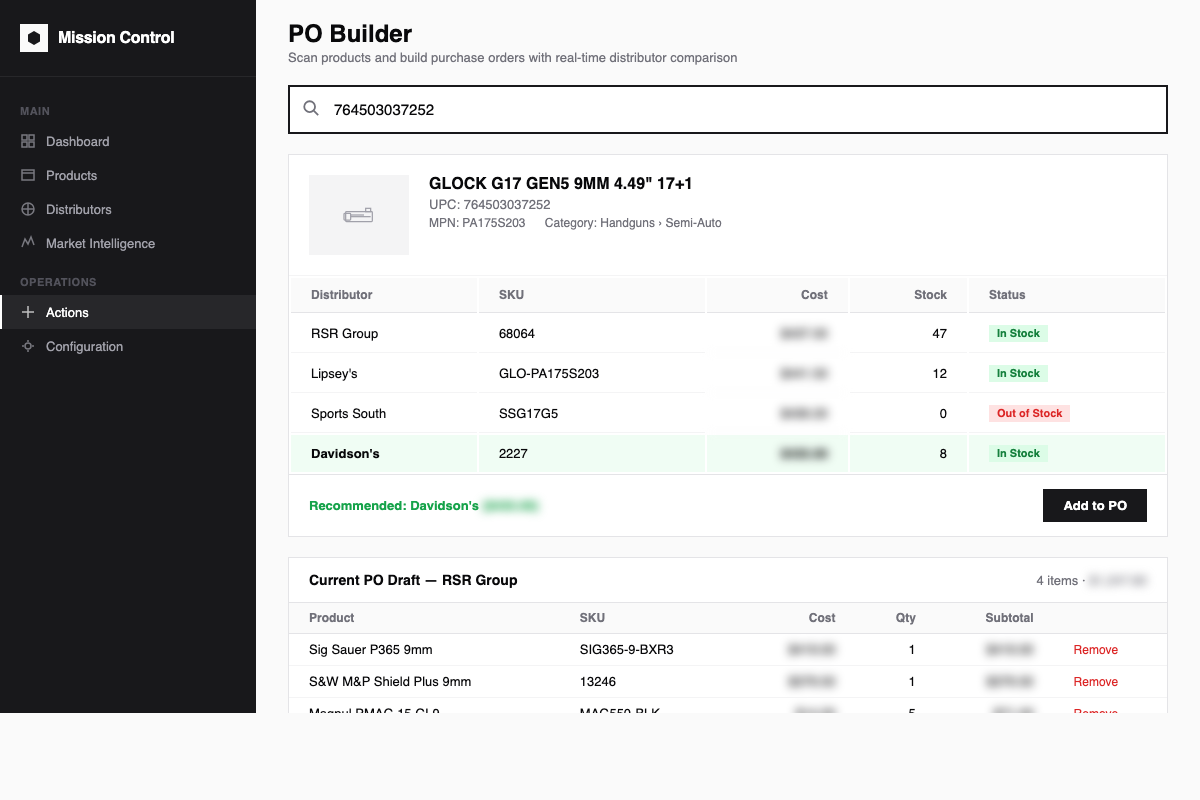
Schedule a live demo at missioncriticalbps.com and we'll walk through the fulfillment engine with real distributor data. Bring a real order — the messier and more complex, the better. That's where Mission Control shows what it's built for.